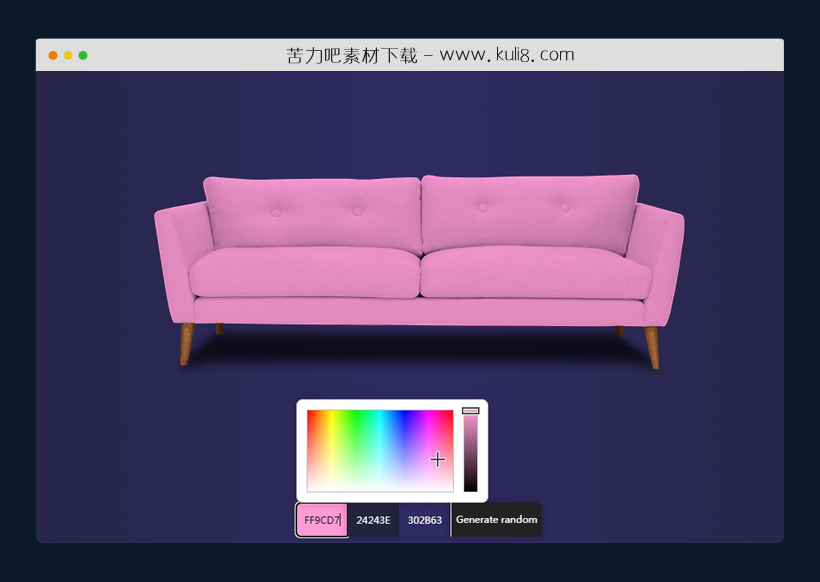

资源描述:一款利用SVG路径遮罩实现图片颜色的任意替换插件,这里我们以沙发图片为例,我们可以任意更改沙发的颜色及其背景颜色。原理是利用SVG绘制沙发的路径结构,然后用选择的颜色填充路径即可。如果你要换一款沙发或者别的产品,那么这个路径就需要重新计算。
SVG路径遮罩实现实物图片颜色任意替换(共6个文件)
- index.html
使用方法
var background = ["#24243e", "#302b63"];
const body = document.getElementsByTagName("body")[0];
const couch = document.getElementById("js-couch");
const col1 = document.getElementById("js-color-1");
const col2 = document.getElementById("js-color-2");
const col3 = document.getElementById("js-color-3");

function updateCouch(picker, string) {
  if (!string) {
  couch.style.fill = picker.toHEXString();
    } else {
      // Used when generating random
      couch.style.fill = string;
     setTimeout(function(){couch.classList.remove("fade");}, 700);
    }
}

function updateBackgroundD(picker, randArray) {
 if (!randArray) {
  background[0] = picker.toHEXString();
  } else {
    background[0] = randArray[0];
  }
  body.style.background =
    "linear-gradient(to right, " +
    background[0] +
    " , " +
    background[1] +
    " , " +
    background[0] +
    ")";
}

function updateBackgroundL(picker, randArray) {
 if (!randArray) {
  background[1] = picker.toHEXString();
  } else {
    background[1] = randArray[1];
  }

  body.style.background =
    "linear-gradient(to right, " +
    background[0] +
    " , " +
    background[1] +
    " , " +
    background[0] +
    ")";
}


// Generate random


function generateRandom() {
// Couch
var red = Math.floor(Math.random() * 256) ;
var green = Math.floor(Math.random() * 256) ;
var blue = Math.floor(Math.random() * 256) ;
// Grad 1
var grad_1_r = Math.floor(Math.random() * 256) ;
var grad_1_g = Math.floor(Math.random() * 256) ;
var grad_1_b = Math.floor(Math.random() * 256) ;
// Grad 2
var grad_2_r = grad_1_r >= 206 ? grad_1_r : grad_1_r + 50;
var grad_2_g = grad_1_g >= 206 ? grad_1_g : grad_1_g + 50;
var grad_2_b = grad_1_b >= 206 ? grad_1_b : grad_1_b + 50;

let hex = rgbToHex(red, green, blue);
let grad_1_hex = rgbToHex(grad_1_r, grad_1_g, grad_1_b);
let grad_2_hex = rgbToHex(grad_2_r, grad_2_g, grad_2_b);

let gradient = [grad_1_hex, grad_2_hex];

  updateCouch(null, hex);
  updateBackgroundD(null, gradient);
  updateBackgroundL(null, gradient);

    couch.classList.add("fade");

 document.getElementById('js-color-1')
    .jscolor.fromString(hex);

 document.getElementById('js-color-2')
    .jscolor.fromString(grad_1_hex);

   document.getElementById('js-color-3')
    .jscolor.fromString(grad_2_hex);
}

function componentToHex(c) {
    var hex = c.toString(16);
    return hex.length == 1 ? "0" + hex : hex;
}

function rgbToHex(r, g, b) {
    return "#" + componentToHex(r) + componentToHex(g) + componentToHex(b);
}
站长提示:
1. 苦力吧素材官方QQ群:950875342
2. 平台上所有素材资源,需注册登录会员方能正常下载。
3. 会员用户积极反馈网站、素材资源BUG或错误问题,每次奖励2K币。
4. PHP源码类素材,如需协助安装调试,或你有二次开发需求,可联系苦力吧客服。
5. 付费素材资源,需充值后方能下载,如有任何疑问可直接联系苦力吧客服
1. 苦力吧素材官方QQ群:950875342
2. 平台上所有素材资源,需注册登录会员方能正常下载。
3. 会员用户积极反馈网站、素材资源BUG或错误问题,每次奖励2K币。
4. PHP源码类素材,如需协助安装调试,或你有二次开发需求,可联系苦力吧客服。
5. 付费素材资源,需充值后方能下载,如有任何疑问可直接联系苦力吧客服
PREVIOUS:
NEXT:
相关资源 / 实用工具

jquery轻量级鼠标悬停自定义工具提示插件
jph-tooltip.js是一个轻量级工具提示插件,它可自动从元素的title或data tip属性中提取工具提示内容。当jQuery不可用或浏览器中禁用JavaScript时,自动返回到本机浏览器工具提示。
实用工具
😀
- 😀
- 😊
- 😂
- 😍
- 😑
- 😷
- 😵
- 😛
- 😣
- 😱
- 😋
- 😎
- 😵
- 😕
- 😶
- 😚
- 😜
- 😭
发表评论