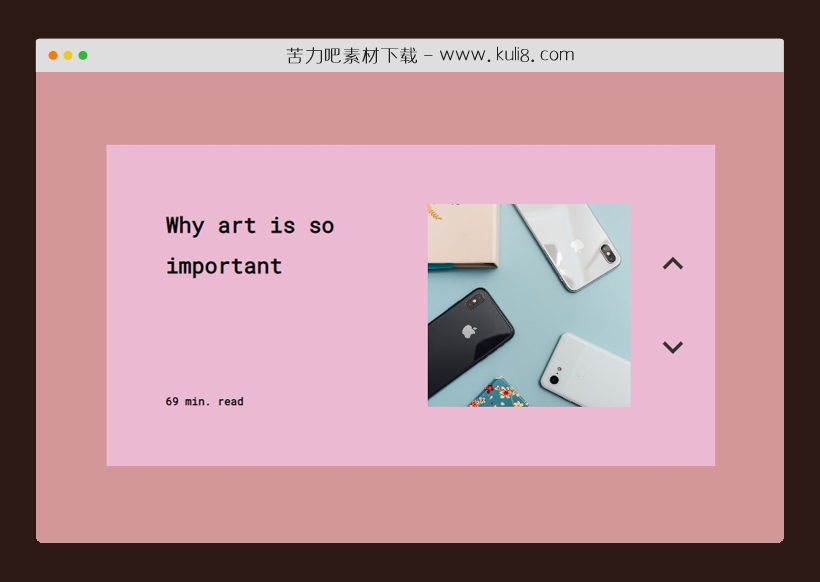

资源描述:一款上下滚动切换的动画特效,鼠标点击上下箭头按钮,可触发图文滚动切换。
js+css创建的上下图文切换特效代码(共5个文件)
- index.html
使用方法
const text1_options = [
"Why art is so important",
"Why you shouldn't buy the new iPhone",
"Is life actually real?",
"How to learn JS in 2 months"];

const text2_options = [
"69 min. read",
"7 min. read",
"8 min. read",
"87,658.1277 min. read"];

const color_options = ["#EBB9D2", "#FE9968", "#7FE0EB", "#6CE5B1"];
const image_options = [
"img/photo-1556656793-08538906a9f8.avif",
"img/photo-1523800503107-5bc3ba2a6f81.avif",
"img/photo-1523800503107-5bc3ba2a6f81.avif",
"img/photo-1524721696987-b9527df9e512.avif"];

var i = 0;
const currentOptionText1 = document.getElementById("current-option-text1");
const currentOptionText2 = document.getElementById("current-option-text2");
const currentOptionImage = document.getElementById("image");
const carousel = document.getElementById("carousel-wrapper");
const mainMenu = document.getElementById("menu");
const optionPrevious = document.getElementById("previous-option");
const optionNext = document.getElementById("next-option");

currentOptionText1.innerText = text1_options[i];
currentOptionText2.innerText = text2_options[i];
currentOptionImage.style.backgroundImage = "url(" + image_options[i] + ")";
mainMenu.style.background = color_options[i];

optionNext.onclick = function () {
  i = i + 1;
  i = i % text1_options.length;
  currentOptionText1.dataset.nextText = text1_options[i];

  currentOptionText2.dataset.nextText = text2_options[i];

  mainMenu.style.background = color_options[i];
  carousel.classList.add("anim-next");

  setTimeout(() => {
    currentOptionImage.style.backgroundImage = "url(" + image_options[i] + ")";
  }, 455);

  setTimeout(() => {
    currentOptionText1.innerText = text1_options[i];
    currentOptionText2.innerText = text2_options[i];
    carousel.classList.remove("anim-next");
  }, 650);
};

optionPrevious.onclick = function () {
  if (i === 0) {
    i = text1_options.length;
  }
  i = i - 1;
  currentOptionText1.dataset.previousText = text1_options[i];

  currentOptionText2.dataset.previousText = text2_options[i];

  mainMenu.style.background = color_options[i];
  carousel.classList.add("anim-previous");

  setTimeout(() => {
    currentOptionImage.style.backgroundImage = "url(" + image_options[i] + ")";
  }, 455);

  setTimeout(() => {
    currentOptionText1.innerText = text1_options[i];
    currentOptionText2.innerText = text2_options[i];
    carousel.classList.remove("anim-previous");
  }, 650);
};
站长提示:
1. 苦力吧素材官方QQ群:950875342
2. 平台上所有素材资源,需注册登录会员方能正常下载。
3. 会员用户积极反馈网站、素材资源BUG或错误问题,每次奖励2K币。
4. PHP源码类素材,如需协助安装调试,或你有二次开发需求,可联系苦力吧客服。
5. 付费素材资源,需充值后方能下载,如有任何疑问可直接联系苦力吧客服
1. 苦力吧素材官方QQ群:950875342
2. 平台上所有素材资源,需注册登录会员方能正常下载。
3. 会员用户积极反馈网站、素材资源BUG或错误问题,每次奖励2K币。
4. PHP源码类素材,如需协助安装调试,或你有二次开发需求,可联系苦力吧客服。
5. 付费素材资源,需充值后方能下载,如有任何疑问可直接联系苦力吧客服
PREVIOUS:
NEXT:
相关资源 / 图片特效&上传


😀
- 😀
- 😊
- 😂
- 😍
- 😑
- 😷
- 😵
- 😛
- 😣
- 😱
- 😋
- 😎
- 😵
- 😕
- 😶
- 😚
- 😜
- 😭
发表评论