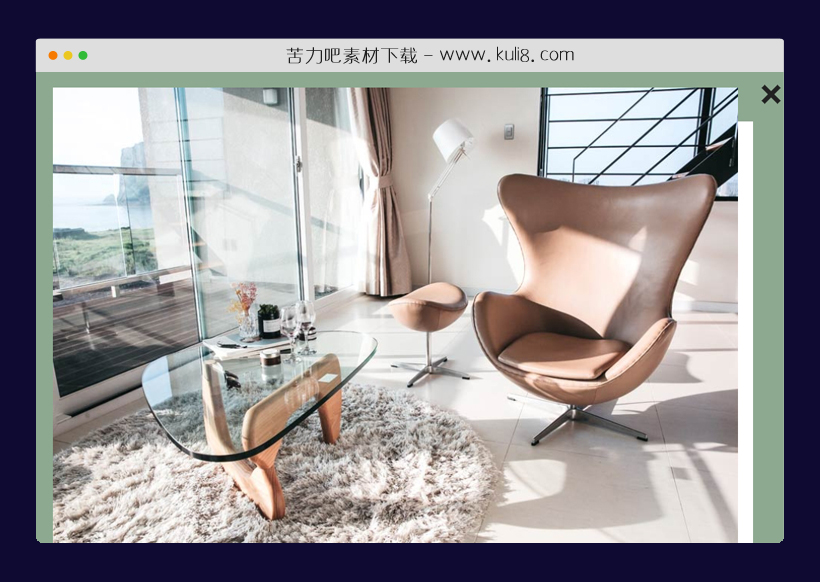

资源描述:一款卡片展开动画特效,鼠标点击卡片,全屏展开大图查看详情,右上角带关闭按钮。
javascript卡片详情页全屏展开效果图片(共7个文件)
- index.html
使用方法
// listing vars here so they're in the global scope
var cards, nCards, cover, openContent, openContentText, pageIsOpen = false,
    openContentImage, closeContent, windowWidth, windowHeight, currentCard;

// initiate the process
init();

function init() {
  resize();
  selectElements();
  attachListeners();
}

// select all the elements in the DOM that are going to be used
function selectElements() {
  cards = document.getElementsByClassName('card'),
  nCards = cards.length,
  cover = document.getElementById('cover'),
  openContent = document.getElementById('open-content'),
  openContentText = document.getElementById('open-content-text'),
  openContentImage = document.getElementById('open-content-image')
  closeContent = document.getElementById('close-content');
}

/* Attaching three event listeners here:
  - a click event listener for each card
  - a click event listener to the close button
  - a resize event listener on the window
*/
function attachListeners() {
  for (var i = 0; i < nCards; i++) {
    attachListenerToCard(i);
  }
  closeContent.addEventListener('click', onCloseClick);
  window.addEventListener('resize', resize);
}

function attachListenerToCard(i) {
  cards[i].addEventListener('click', function(e) {
    var card = getCardElement(e.target);
    onCardClick(card, i);
  })
}

/* When a card is clicked */
function onCardClick(card, i) {
  // set the current card
  currentCard = card;
  // add the 'clicked' class to the card, so it animates out
  currentCard.className += ' clicked';
  // animate the card 'cover' after a 500ms delay
  setTimeout(function() {animateCoverUp(currentCard)}, 500);
  // animate out the other cards
  animateOtherCards(currentCard, true);
  // add the open class to the page content
  openContent.className += ' open';
}

/*
* This effect is created by taking a separate 'cover' div, placing
* it in the same position as the clicked card, and animating it to
* become the background of the opened 'page'.
* It looks like the card itself is animating in to the background,
* but doing it this way is more performant (because the cover div is
* absolutely positioned and has no children), and there's just less
* having to deal with z-index and other elements in the card
*/
function animateCoverUp(card) {
  // get the position of the clicked card
  var cardPosition = card.getBoundingClientRect();
  // get the style of the clicked card
  var cardStyle = getComputedStyle(card);
  setCoverPosition(cardPosition);
  setCoverColor(cardStyle);
  scaleCoverToFillWindow(cardPosition);
  // update the content of the opened page
  openContentText.innerHTML = '<h1>'+card.children[2].textContent+'</h1>'+paragraphText;
  openContentImage.src = card.children[1].src;
  setTimeout(function() {
    // update the scroll position to 0 (so it is at the top of the 'opened' page)
    window.scroll(0, 0);
    // set page to open
    pageIsOpen = true;
  }, 300);
}

function animateCoverBack(card) {
  var cardPosition = card.getBoundingClientRect();
  // the original card may be in a different position, because of scrolling, so the cover position needs to be reset before scaling back down
  setCoverPosition(cardPosition);
  scaleCoverToFillWindow(cardPosition);
  // animate scale back to the card size and position
  cover.style.transform = 'scaleX('+1+') scaleY('+1+') translate3d('+(0)+'px, '+(0)+'px, 0px)';
  setTimeout(function() {
    // set content back to empty
    openContentText.innerHTML = '';
    openContentImage.src = '';
    // style the cover to 0x0 so it is hidden
    cover.style.width = '0px';
    cover.style.height = '0px';
    pageIsOpen = false;
    // remove the clicked class so the card animates back in
    currentCard.className = currentCard.className.replace(' clicked', '');
  }, 301);
}

function setCoverPosition(cardPosition) {
  // style the cover so it is in exactly the same position as the card
  cover.style.left = cardPosition.left + 'px';
  cover.style.top = cardPosition.top + 'px';
  cover.style.width = cardPosition.width + 'px';
  cover.style.height = cardPosition.height + 'px';
}

function setCoverColor(cardStyle) {
  // style the cover to be the same color as the card
  cover.style.backgroundColor = cardStyle.backgroundColor;
}

function scaleCoverToFillWindow(cardPosition) {
  // calculate the scale and position for the card to fill the page,
  var scaleX = windowWidth / cardPosition.width;
  var scaleY = windowHeight / cardPosition.height;
  var offsetX = (windowWidth / 2 - cardPosition.width / 2 - cardPosition.left) / scaleX;
  var offsetY = (windowHeight / 2 - cardPosition.height / 2 - cardPosition.top) / scaleY;
  // set the transform on the cover - it will animate because of the transition set on it in the CSS
  cover.style.transform = 'scaleX('+scaleX+') scaleY('+scaleY+') translate3d('+(offsetX)+'px, '+(offsetY)+'px, 0px)';
}

/* When the close is clicked */
function onCloseClick() {
  // remove the open class so the page content animates out
  openContent.className = openContent.className.replace(' open', '');
  // animate the cover back to the original position card and size
  animateCoverBack(currentCard);
  // animate in other cards
  animateOtherCards(currentCard, false);
}

function animateOtherCards(card, out) {
  var delay = 100;
  for (var i = 0; i < nCards; i++) {
    // animate cards on a stagger, 1 each 100ms
    if (cards[i] === card) continue;
    if (out) animateOutCard(cards[i], delay);
    else animateInCard(cards[i], delay);
    delay += 100;
  }
}

// animations on individual cards (by adding/removing card names)
function animateOutCard(card, delay) {
  setTimeout(function() {
    card.className += ' out';
   }, delay);
}

function animateInCard(card, delay) {
  setTimeout(function() {
    card.className = card.className.replace(' out', '');
  }, delay);
}

// this function searches up the DOM tree until it reaches the card element that has been clicked
function getCardElement(el) {
  if (el.className.indexOf('card ') > -1) return el;
  else return getCardElement(el.parentElement);
}

// resize function - records the window width and height
function resize() {
  if (pageIsOpen) {
    // update position of cover
    var cardPosition = currentCard.getBoundingClientRect();
    setCoverPosition(cardPosition);
    scaleCoverToFillWindow(cardPosition);
  }
  windowWidth = window.innerWidth;
  windowHeight = window.innerHeight;
}

var paragraphText = '<p>Somebody once told me the world is gonna roll me. I ain\'t the sharpest tool in the shed. She was looking kind of dumb with her finger and her thumb in the shape of an "L" on her forehead. Well the years start coming and they don\'t stop coming. Fed to the rules and I hit the ground running. Didn\'t make sense not to live for fun. Your brain gets smart but your head gets dumb. So much to do, so much to see. So what\'s wrong with taking the back streets? You\'ll never know if you don\'t go. You\'ll never shine if you don\'t glow.</p><p>Hey now, you\'re an all-star, get your game on, go play. Hey now, you\'re a rock star, get the show on, get paid. And all that glitters is gold. Only shooting stars break the mold.</p><p>It\'s a cool place and they say it gets colder. You\'re bundled up now, wait till you get older. But the meteor men beg to differ. Judging by the hole in the satellite picture. The ice we skate is getting pretty thin. The water\'s getting warm so you might as well swim. My world\'s on fire, how about yours? That\'s the way I like it and I never get bored.</p>';
站长提示:
1. 苦力吧素材官方QQ群:950875342
2. 平台上所有素材资源,需注册登录会员方能正常下载。
3. 会员用户积极反馈网站、素材资源BUG或错误问题,每次奖励2K币。
4. PHP源码类素材,如需协助安装调试,或你有二次开发需求,可联系苦力吧客服。
5. 付费素材资源,需充值后方能下载,如有任何疑问可直接联系苦力吧客服
1. 苦力吧素材官方QQ群:950875342
2. 平台上所有素材资源,需注册登录会员方能正常下载。
3. 会员用户积极反馈网站、素材资源BUG或错误问题,每次奖励2K币。
4. PHP源码类素材,如需协助安装调试,或你有二次开发需求,可联系苦力吧客服。
5. 付费素材资源,需充值后方能下载,如有任何疑问可直接联系苦力吧客服
PREVIOUS:
NEXT:
相关资源 / 动画效果
javascript三种不同的海底世界动画特效
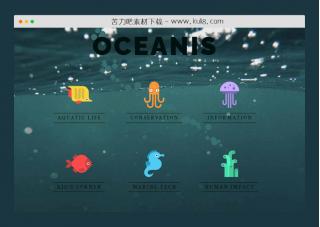
一款全屏响应式海底世界动画效果,共包含3个html页面文件,集成了三种不同的鼠标跟随气泡,以及支持手动开关的背景音乐。页面滚动切换后,进入到海底世界界面。
动画效果
😀
- 😀
- 😊
- 😂
- 😍
- 😑
- 😷
- 😵
- 😛
- 😣
- 😱
- 😋
- 😎
- 😵
- 😕
- 😶
- 😚
- 😜
- 😭
发表评论