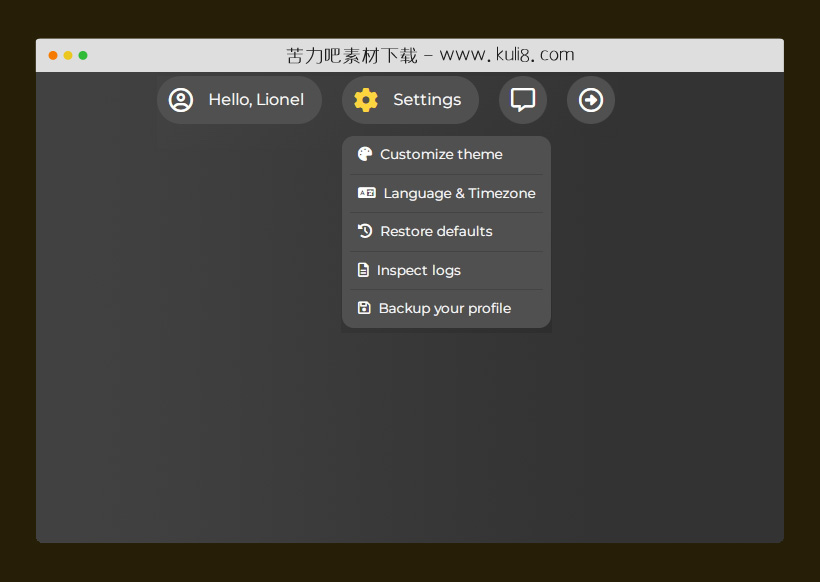

资源描述:一款垂直下拉菜单特效,鼠标点击按钮动画展开显示下拉菜单,再次点击按钮可收缩隐藏菜单。通常运用于页面顶部模块。
原生js常用的页面顶部点击按钮展开下拉菜单特效代码(共3个文件)
- index.html
使用方法
//The menu js class:
class sikFloatingMenu {
    menuEl = null;
    constructor(_menu) {
        //The menu element:
        this.menuEl = typeof _menu === 'string'
                      ? document.querySelector(_menu)
                      : _menu;
        //Attach handlers:
        this.attachHandlers();
    }
    attachHandlers() {
        if (this.menuEl) {
            this._on(this.menuEl, 'click', '.trigger-menu', this._handler.bind(this));
        }
    }
    _open(item) {
        let opened = item.closest('.fmenu').querySelectorAll('.trigger-menu.open');
        for (const ele of opened) {
            this._close(ele);
        }
        item.classList.add('open');
        //expand:
        let list = item.closest('li').querySelector(".floating-menu");
        list.style.setProperty("max-height", this._measureExpandableList(list));
        list.style.setProperty("opacity", "1");
        item.style.setProperty("max-width", this._measureExpandableTrigger(item));
    }
    _close(item) {
        let list = item.closest('li').querySelector(".floating-menu");
        item.classList.remove('open');
        //shrink:
        list.style.removeProperty("max-height");
        list.style.removeProperty("opacity");
        item.style.removeProperty("max-width");
    }
    _measureExpandableList(list) {
        const items = list.querySelectorAll('li');
        return (items.length * this._getHeight(items[0], "outer") + 10) + 'px';
    }
    _measureExpandableTrigger(item) {
        const textEle = item.querySelector('.text');
        const sizeBase = this._getWidth(item, "outer");
        const sizeExpandLabel = this._getWidth(textEle, "outer");
        return (sizeBase + sizeExpandLabel + 6) + 'px';
    }
    _handler(el, ev) {
        if (el.classList.contains('open')) {
            this._close(el);
        } else {
            this._open(el);
        }
    }
    _on(ele, type, selector, handler) {
        ele.addEventListener(type, function(ev) {
            let el = ev.target.closest(selector);
            if (el) handler.call(this, el, ev); //The element is bind to this
        });
    }
    _getWidth(el, type) {
        if (type === 'inner')
            return el.clientWidth;
        else if (type === 'outer')
            return el.offsetWidth;
        return 0;
    }
    _getHeight(el, type) {
        if (type === 'inner')
            return el.clientHeight;
        else if (type === 'outer')
            return el.offsetHeight;
        return 0;
    }
}

//Intialize menu:
window.sik_menu = new sikFloatingMenu("#mymenu");
站长提示:
1. 苦力吧素材官方QQ群:950875342
2. 平台上所有素材资源,需注册登录会员方能正常下载。
3. 会员用户积极反馈网站、素材资源BUG或错误问题,每次奖励2K币。
4. PHP源码类素材,如需协助安装调试,或你有二次开发需求,可联系苦力吧客服。
5. 付费素材资源,需充值后方能下载,如有任何疑问可直接联系苦力吧客服
1. 苦力吧素材官方QQ群:950875342
2. 平台上所有素材资源,需注册登录会员方能正常下载。
3. 会员用户积极反馈网站、素材资源BUG或错误问题,每次奖励2K币。
4. PHP源码类素材,如需协助安装调试,或你有二次开发需求,可联系苦力吧客服。
5. 付费素材资源,需充值后方能下载,如有任何疑问可直接联系苦力吧客服
PREVIOUS:
NEXT:
相关资源 / 导航菜单

😀
- 😀
- 😊
- 😂
- 😍
- 😑
- 😷
- 😵
- 😛
- 😣
- 😱
- 😋
- 😎
- 😵
- 😕
- 😶
- 😚
- 😜
- 😭
发表评论