

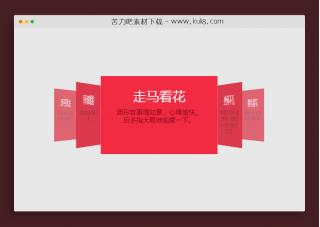
资源描述:一款响应式手风琴收缩展开滑块插件,在不同的屏幕下展现不同的排版,手机端(展示竖版)、PC电脑端(展开水平排版),很实用。
jquery响应式手风琴图片自动折叠展开特效代码(共7个文件)
- main.js
- index.html
- style.css
使用方法
var slideCount = document.querySelectorAll(".slider").length - 1;
var slideIndex = 1;
var direction;
var sliderSpeed = 700;
var sliderAutoplayTime = 3000;
var sliderHeight = 600;
var sliderWidth = $(".slider-wrapper").width();

if ($(window).width() > 767) {
	desktopSlider();
} else {
	mobileSlider();
}

function desktopSlider() {
	direction = "left";

	$(".slider.first").css("left", 0);

	var timer = setInterval(() => {
		playAnimation("left", "left", ".slider", "right");
	}, sliderAutoplayTime);

	$(".slider").click(function () {
		let elem = $(this);
		let index = parseInt(elem.data("index"));
		let position;

		clearInterval(timer);

		slideIndex = index;

		if ($(`.slider:nth-of-type(${index + 2})`).hasClass("slide")) {
			if (index == 3) {
				return false;
			} else {
				$(".slider").each(function (pos, el) {
					if ($(`.slider:nth-of-type(${pos + 2})`).hasClass("slide") && pos >= index) {
						position = sliderWidth - (slideCount - (pos + 1)) * 50 + "px";
						$(`.slider:nth-of-type(${pos + 2})`)
							.stop()
							.animate({ left: position }, sliderSpeed);
						$(`.slider:nth-of-type(${pos + 2})`).toggleClass("active slide");
					}
				});
			}
		} else {
			if (index == 1) {
				position = index * 50 + "px";
				elem.stop().animate({ left: position }, 500);
				elem.toggleClass("slide");
			} else {
				$(".slider").each(function (pos, el) {
					if (pos != 0 && !$(el).hasClass("slide") && pos <= index) {
						position = pos * 50 + "px";
						$(el).stop().animate({ left: position }, sliderSpeed);
						$(el).toggleClass("slide");
					}
				});
			}
		}

		checkIndex("left", "right");
		timer = setInterval(() => {
			playAnimation("left", "left", ".slider", "right");
		}, sliderAutoplayTime);
	});
}

function mobileSlider() {
	direction = "top";

	$(".m-slider.first").css("top", 0);

	var timer = setInterval(() => {
		playAnimation("top", "top", ".m-slider", "bottom");
	}, sliderAutoplayTime);

	$(".m-slider").click(function () {
		let elem = $(this);
		let index = parseInt(elem.data("index"));
		let position;

		clearInterval(timer);

		slideIndex = index;

		if (index == 0) return false;

		if (elem.hasClass("slide")) {
			$(".m-slider").each(function (pos, el) {
				if ($(el).hasClass("slide") && pos >= index) {
					position = sliderHeight - (slideCount - pos + 1) * 50 + "px";
					$(el).stop().animate({ top: position }, sliderSpeed);
					$(el).toggleClass("slide");
				}
			});
		} else {
			$(".m-slider").each(function (pos, el) {
				if (pos != 0 && !$(el).hasClass("slide") && pos <= index) {
					position = pos * 50 + "px";
					$(el).stop().animate({ top: position }, sliderSpeed);
					$(el).toggleClass("slide");
				}
			});
		}

		checkIndex("top", "bottom");
		timer = setInterval(() => {
			playAnimation("top", "top", ".m-slider", "bottom");
		}, sliderAutoplayTime);
	});
}

/**
 * Play animation
 * @param {string} sliderDirection it is direction of slider (left-right, top-bottom)
 * @param {string} animateDirection it is a direction of animation (left, top)
 * @param {string} sliderClass the class of slider, in case of desktop ".slider" and mobile ".m-slider"
 * @param {string} secondaryDirection it is a second parameter of checkIndex function
 * @function
 * return void
 */
function playAnimation(sliderDirection, animateDirection, sliderClass, secondaryDirection) {
	var position;
	if (direction === sliderDirection) {
		position = slideIndex * 50 + "px";
		$(`${sliderClass}:nth(${slideIndex})`).addClass("slide");
	} else {
		if (sliderDirection == "left") {
			position = sliderWidth - (slideCount - slideIndex) * 50 + "px";
		} else {
			position = sliderHeight - (slideCount - (slideIndex - 1)) * 50 + "px";
		}
		$(`${sliderClass}:nth(${slideIndex})`).removeClass("slide");
	}

	let animationParams = {};
	animationParams[animateDirection] = position;

	$(`${sliderClass}:nth(${slideIndex})`)
		.stop()
		.animate(animationParams, sliderSpeed, function () {
			checkIndex(animateDirection, secondaryDirection);
		});
}

/**
 * It is check the slider direction and increase or decreases
 * the sliderIndex variable.
 * @param {string} direction1 primary slider direction
 * @param {string} direction2 secondary slider direction
 * @function
 * return void
 */
function checkIndex(direction1, direction2) {
	if (slideIndex == 1 && direction == direction2) {
		direction = direction1;
	} else if (slideIndex >= 1 && direction == direction1 && slideIndex < slideCount) {
		slideIndex++;
	} else if ((slideIndex == slideCount || slideIndex < slideCount) && direction == direction2) {
		slideIndex--;
	} else if (slideIndex == slideCount) {
		direction = direction2;
	}
}
站长提示:
1. 苦力吧素材官方QQ群:950875342
2. 平台上所有素材资源,需注册登录会员方能正常下载。
3. 会员用户积极反馈网站、素材资源BUG或错误问题,每次奖励2K币。
4. PHP源码类素材,如需协助安装调试,或你有二次开发需求,可联系苦力吧客服。
5. 付费素材资源,需充值后方能下载,如有任何疑问可直接联系苦力吧客服
1. 苦力吧素材官方QQ群:950875342
2. 平台上所有素材资源,需注册登录会员方能正常下载。
3. 会员用户积极反馈网站、素材资源BUG或错误问题,每次奖励2K币。
4. PHP源码类素材,如需协助安装调试,或你有二次开发需求,可联系苦力吧客服。
5. 付费素材资源,需充值后方能下载,如有任何疑问可直接联系苦力吧客服
PREVIOUS:
NEXT:
相关资源 / 图片特效&上传


😀
- 😀
- 😊
- 😂
- 😍
- 😑
- 😷
- 😵
- 😛
- 😣
- 😱
- 😋
- 😎
- 😵
- 😕
- 😶
- 😚
- 😜
- 😭
发表评论