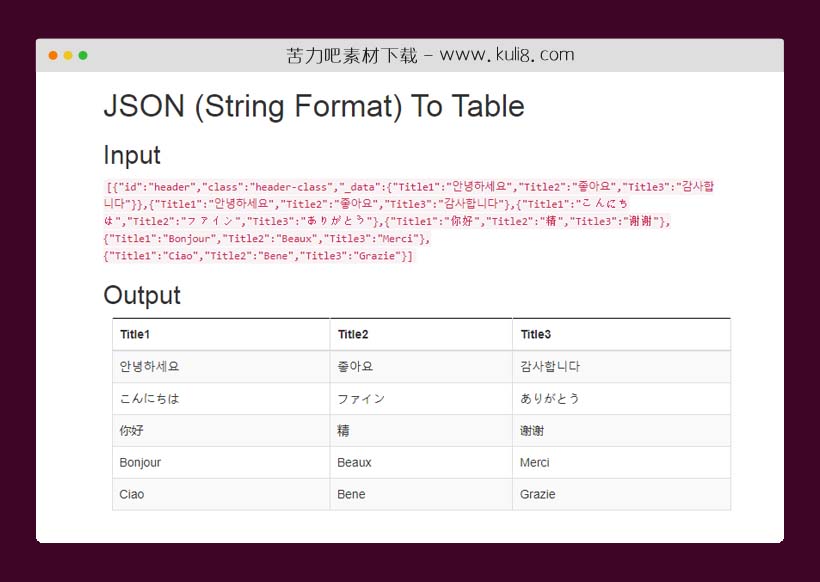

资源描述:一个轻量级但功能强大的jQueryJSON-to-Table插件,可对JSON数组或JSON对象快速生成HTML表格。
jquery通过把json数据转换输出为table表格插件(共9个文件)
- index.html
使用方法
$(document).ready(function() {
var arr = [
[1, 2, 3],
["one", "two", "three"]
];
/* Array To Table */
var input = JSON.stringify(arr);
$("#jsontotable-arr")
.append($("
").html("Array To Table"))
.append($("
").html("Input"))
.append($("
").html("Output"));
$.jsontotable(arr, { id: "#jsontotable-arr", header: true });
/* Array To Table (Without Header) */
$("#jsontotable-arr")
.append($("
").html("Array To Table (Without Header)"))
.append($("
").html("Input"))
.append($("
").html("Output"));
$.jsontotable(arr, { id: "#jsontotable-arr", header: false });
var obj = [
{"Title1": "Hello", "Title2": "Fine", "Title3": "Thank you"},
{"Title1": "안녕하세요", "Title2": "좋아요", "Title3": "감사합니다"},
{"Title1": "こんにちは", "Title2": "ファイン", "Title3": "ありがとう"},
{"Title1": "你好", "Title2": "精", "Title3": "谢谢"},
{"Title1": "Bonjour", "Title2": "Beaux", "Title3": "Merci"},
{"Title1": "Ciao", "Title2": "Bene", "Title3": "Grazie"}
];
/* JSON To Table (Has Header) */
input = JSON.stringify(obj);
$("#jsontotable-obj")
.append($("
").html("JSON To Table (Has Header)"))
.append($("
").html("Input"))
.append($("
").html("Output"));
$.jsontotable(obj, { id: "#jsontotable-obj" });
/* JSON To Table (Without Header) */
$("#jsontotable-obj")
.append($("
").html("JSON To Table (Without Header)"))
.append($("
").html("Input"))
.append($("
").html("Output"));
$.jsontotable(obj, { id: "#jsontotable-obj", header: false });
var objmissing = [
{"Title1": "Hello", "Title2": "Fine", "Title3": "Thank you"},
{"Title1": "안녕하세요", "Title2": "좋아요", "Title3": "감사합니다"},
{"Title4": "こんにちは", "Title2": "ファイン", "Title5": "ありがとう"},
{"Title1": "你好", "Title5": "精", "Title3": "谢谢"},
{"Title5": "Bonjour", "Title4": "Beaux", "Title3": "Merci"},
{"Title1": "Ciao", "Title6": "Bene", "Title7": "Grazie"}
];
/* JSON To Table (Has Header and Missing some columns in body */
input = JSON.stringify(objmissing);
$("#jsontotable-obj")
.append($("
").html("JSON To Table (Has Header and Missing some columns in body)"))
.append($("
").html("Input"))
.append($("
").html("Output"));
$.jsontotable(objmissing, { id: "#jsontotable-obj" , header: true });
var objwithdata = [
{ id: "header", "class": "header-class", _data:{"Title1": "안녕하세요", "Title2": "좋아요", "Title3": "감사합니다"} },
{"Title1": "안녕하세요", "Title2": "좋아요", "Title3": "감사합니다"},
{"Title1": "こんにちは", "Title2": "ファイン", "Title3": "ありがとう"},
{"Title1": "你好", "Title2": "精", "Title3": "谢谢"},
{"Title1": "Bonjour", "Title2": "Beaux", "Title3": "Merci"},
{"Title1": "Ciao", "Title2": "Bene", "Title3": "Grazie"}
];
/* JSON To Table with _data attribute (Has Header) */
input = JSON.stringify(objwithdata);
$("#jsontotable-objwithdata")
.append($("
").html("JSON To Table with _data attribute (Has Header)"))
.append($("
").html("Input"))
.append($("
").html("Output"));
$.jsontotable(objwithdata, { id: "#jsontotable-objwithdata" });
/* JSON To Table with _data attribute (Without Header) */
$("#jsontotable-objwithdata")
.append($("
").html("JSON To Table with _data attribute (Without Header)"))
.append($("
").html("Input"))
.append($("
").html("Output"));
$.jsontotable(objwithdata, { id: "#jsontotable-objwithdata", header: false });
var str = "[\
{\"Title1\": \"Hello\", \"Title2\": \"Fine\", \"Title3\": \"Thank you\"}, \
{\"Title1\": \"안녕하세요\", \"Title2\": \"좋아요\", \"Title3\": \"감사합니다\"}, \
{\"Title1\": \"こんにちは\", \"Title2\": \"ファイン\", \"Title3\": \"ありがとう\"}, \
{\"Title1\": \"你好\", \"Title2\": \"精\", \"Title3\": \"谢谢\"}, \
{\"Title1\": \"Bonjour\", \"Title2\": \"Beaux\", \"Title3\": \"Merci\"}, \
{\"Title1\": \"Ciao\", \"Title2\": \"Bene\", \"Title3\": \"Grazie\"} \
]";
/* JSON (String Format) To Table" */
$("#jsontotable-str")
.append($("
").html("JSON (String Format) To Table"))
.append($("
").html("Input"))
.append($("
").html("Output"));
$.jsontotable(str, {
id: "#jsontotable-str",
className: "table table-bordered table-striped"
});
});
站长提示:
1. 苦力吧素材官方QQ群:950875342
2. 平台上所有素材资源,需注册登录会员方能正常下载。
3. 会员用户积极反馈网站、素材资源BUG或错误问题,每次奖励2K币。
4. PHP源码类素材,如需协助安装调试,或你有二次开发需求,可联系苦力吧客服。
5. 付费素材资源,需充值后方能下载,如有任何疑问可直接联系苦力吧客服
1. 苦力吧素材官方QQ群:950875342
2. 平台上所有素材资源,需注册登录会员方能正常下载。
3. 会员用户积极反馈网站、素材资源BUG或错误问题,每次奖励2K币。
4. PHP源码类素材,如需协助安装调试,或你有二次开发需求,可联系苦力吧客服。
5. 付费素材资源,需充值后方能下载,如有任何疑问可直接联系苦力吧客服
PREVIOUS:
NEXT:
相关资源 / 实用工具


😀
- 😀
- 😊
- 😂
- 😍
- 😑
- 😷
- 😵
- 😛
- 😣
- 😱
- 😋
- 😎
- 😵
- 😕
- 😶
- 😚
- 😜
- 😭
发表评论